The standard ASP.NET DataGrid control is a great control. You can use it for many things, it even supports Paging and Column Sorting. Those last two option although work using postbacks to the server.
Internet Explorer 5.0 (and higher) support XML Client-side Data-Binding. This is a powerful DHTML feature which is not used in the .NET Framework. It allows.
The DataIslandGrid control is an ASP.NET grid which is bound to a DataTable in a DataSet. The DataSet is serialized and rendered to an Xml DataIsland. The Grid uses Tabular Data-Binding to the Xml DataIsland. This makes it possible to support client-side Column Sorting and Paging. The Column Sorting is implemented using a JavaScript and a StyleSheet in a second Xml DataIsland.
Example
The following grid is a DataIslandGrid which is bound to the Authors table of the SQLServer pubs database.
| ID | Firstname | Lastname | Address | City |
|---|---|---|---|---|
| << < > >> | ||||
|
172-32-1176
|
Johnson
|
White
|
abc
|
Stein
|
|
213-46-8915
|
Marjorie
|
Green
|
abc
|
Oakland
|
|
238-95-7766
|
Rony
|
Carson
|
abc
|
Berkeley
|
|
267-41-2394
|
Michael
|
O'Leary
|
abc
|
San Jose
|
|
274-80-9391
|
Dean
|
Straight
|
abc
|
Oakland
|
|
341-22-1782
|
Meander
|
Smith
|
abc
|
Lawrence
|
|
409-56-7008
|
Abrahamfdfs
|
Bennett
|
abc
|
Berkeley
|
|
427-17-2319
|
Ann
|
Dull
|
abc
|
Palo Alto
|
|
472-27-2349
|
Burt
|
Gringlesby
|
abc
|
Covelo
|
|
486-29-1786
|
Charlene
|
Locksley
|
abc
|
San Francisco
|
The Html of this page must have redirective to the DataIslandGridProject. Then you can add the DataIslandGrid control to the Page. The best way to do this is by adding the assembly to your Toolbox. You then can drag&drop the DataIslandGrid from your Toolbox onto your Page.
.
.
<rit:DataIslandGrid id="DataIslandGrid1"runat="server" CellSpacing="0" BorderWidth="1px"
AllowSorting="true" CssClass="clsTest"width="80%" BorderColor="WhiteSmoke">
<rit:BoundColumn CssClass="clsColumnID" Width="120px" DataField="au_id" HeaderText="ID"/>
<rit:BoundColumn DataField="au_fname" HeaderText="Firstname"></rit:BoundColumn>
<rit:BoundColumn DataField="au_lname" HeaderText="Lastname"></rit:BoundColumn>
<rit:BoundColumn DataField="address" HeaderText="Address"></rit:BoundColumn>
<rit:BoundColumn DataField="city" HeaderText="City"></rit:BoundColumn>
</rit:DataIslandGrid>
.
.
You add Columns to the datagrid using the BoundColumn Collection Editor.
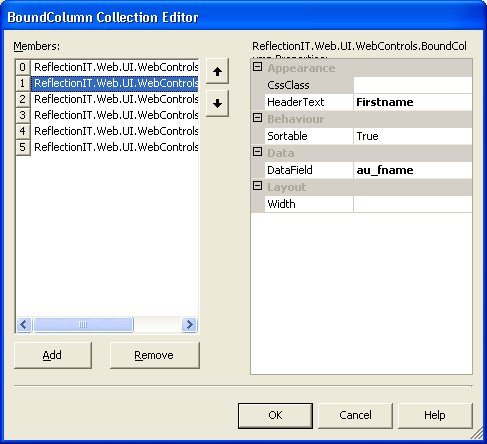
The following code binds the DataGrid to the Authors table. I have converted the SQLServer table to an MS Access database to make testing easier.
{
protected ReflectionIT.Web.UI.WebControls.DataIslandGrid DataIslandGrid1;
privatevoid Page_Load(objectsender, System.EventArgs e)
{
stringconnectString=string.Format(
@"Provider=Microsoft.Jet.OLEDB.4.0;Password=;User ID=Admin;Data Source={0};",
Server.MapPath("pubs.mdb"));
using(OleDbConnection con=new OleDbConnection(connectString)){
con.Open();
using(OleDbCommand cmd=new OleDbCommand("select * from Authors",con)){
OleDbDataAdapter da= new OleDbDataAdapter(cmd);
DataSet ds= new DataSet();
da.Fill(ds);
// Bind the DataGrid
DataIslandGrid1.DataSet =ds;
}
}
}
}
DataIslandGrid Control
The DataIslandGrid class is a WebControl with a lot of attributes. The ParseChilderenAttribute is set to the Columns property. It enables a control to specify how the page parser interprets nested elements within the control's tags when the control is used declaratively on an ASP.NET page. Columns is a property of type BoundColumnsCollection and holds items of the BoundColumn type
[ParseChildren(true,"Columns")]
[PersistChildren(false)]
[Designer(typeof(ReflectionIT.Web.UI.WebControls.Design.DataIslandGridDesigner))]
[DefaultProperty("Columns")]
publicclass DataIslandGrid : System.Web.UI.WebControls.WebControl
The class has a set of public properties which allows you to configure it. The real magic is done in the Render() and OnPreRender() methods:
- JavaScript code for client-side sorting is added to the Page.
- The DataTable from the DataSet is rendered to an Xml DataIsland using the WriteXml() method of the DataSet.
- An Xml StyleSheet is rendered in a second Xml DataIsland. This StyleSheet is used by the JavaScript to do the sorting. It uses a xsl:for-each loop with a order-by attribute. The value of this attribute is set in the JavaScript.
- A <table> tag is rendered with a datasrc attribute which is set to the ID of first XmlDataIsland
- For each Column a table cell (<td>) is rendered within a <thead> section. In this Cell a hyperlink is rendered with a NavigateUrl property to the JavaScript which does the client-side sorting. The Text of the hyperlink is set to the HeaderText property.
- For each Column a table cell (<td>) is rendered within a <tbody> section. In this Cell a <div> tag is rendered with a datafld attribute which is set to the DataField property.
- A <tfoot> section is rendered with four hyperlinks for paging: MoveFirst, MovePrevious, MoveNext and MoveLast.
- All tags are closed.
/// Add a JavaScript to the Page to sort a column
/// </summary>
/// <param name="e"></param>
override protected void OnPreRender(EventArgs e){
if(this.Page.Request.Browser.JavaScript == true){
// Build JavaScript
System.Text.StringBuilder s =new System.Text.StringBuilder();
s.Append("\n<script type='text/javascript' language='JavaScript'>\n");
s.Append("<!--\n");
s.Append("function sortColumn(xmldoc, xsldoc, sortcol) {\n");
s.Append(" xsldoc.selectSingleNode(\"//xsl:for-each\").setAttribute(\"order-by\", sortcol);\n");
s.Append(" xmldoc.documentElement.transformNodeToObject(xsldoc.documentElement,xmldoc);\n");
s.Append("}\n");
s.Append("// -->\n");
s.Append("</script>\n");
// Add the Script to the Page
this.Page.RegisterClientScriptBlock("SortDataIslandGrid", s.ToString());
}
}
/// <summary>
/// Sends server control content to a provided HtmlTextWriter object, which writes
/// the content to be rendered on the client.
/// </summary>
/// <param name="writer">The HtmlTextWriter object that receives the server control content.</param>
protectedoverridevoid Render(HtmlTextWriter writer) {
if(_dataSet!=null) {
// XML
stringoldNS= DataSet.Namespace;
DataSet.Namespace ="";
writer.AddAttribute("id","xml" +this.ClientID);
writer.RenderBeginTag("XML");
DataSet.WriteXml(writer, XmlWriteMode.IgnoreSchema);
writer.RenderEndTag();//XML
DataSet.Namespace =oldNS ;
// XSL (sorting)
if(this.AllowSorting){
writer.AddAttribute("id","xsl"+this.ClientID);
writer.RenderBeginTag("XML");
writer.RenderBeginTag(DataSet.DataSetName);
writer.AddAttribute("order-by", "?");
writer.AddAttribute("select", DataTable.TableName);
writer.AddAttribute("xmlns:xsl", "https://www.w3.org/TR/WD-xsl");
writer.RenderBeginTag("xsl:for-each");
writer.WriteBeginTag(DataTable.TableName);
writer.Write(HtmlTextWriter.TagRightChar);
foreach(DataColumn colin DataTable.Columns){
writer.WriteBeginTag(col.ColumnName);
writer.Write(HtmlTextWriter.TagRightChar);
writer.WriteBeginTag("xsl:value-of");
writer.WriteAttribute("select",col.ColumnName);
writer.Write(HtmlTextWriter.SlashChar);
writer.Write(HtmlTextWriter.TagRightChar);
writer.WriteEndTag(col.ColumnName);
}
writer.WriteEndTag(DataTable.TableName);
writer.RenderEndTag(); //xsl:for-each"
writer.RenderEndTag();
writer.RenderEndTag(); //XML
}
}
bool design=(this.Site !=null&&this.Site.DesignMode);
if(_dataSet!=null| design){
// Table
writer.AddAttribute("datasrc","#xml" +this.ClientID);
writer.AddAttribute("id",this.ClientID);
writer.AddAttribute("CellPadding",this.CellPadding.ToString());
writer.AddAttribute("CellSpacing",this.CellSpacing.ToString());
if(this.AllowPaging){
writer.AddAttribute("dataPageSize", PageSize.ToString());
}
if(!this.BorderWidth.IsEmpty){
writer.AddAttribute("border", BorderWidth.ToString());
}
if(this.CssClass != string.Empty){
writer.AddAttribute("class", CssClass);
}
if(this.ControlStyleCreated &&this.ControlStyle !=null){
ControlStyle.AddAttributesToRender(writer);
}
writer.RenderBeginTag("table");
// Header
writer.RenderBeginTag("thead");
writer.RenderBeginTag("tr");
foreach(ReflectionIT.Web.UI.WebControls.BoundColumn bcin_columns){
if(!bc.Width.IsEmpty){
writer.AddAttribute("width",bc.Width.ToString());
}
writer.RenderBeginTag("th");
if(this.AllowSorting &bc.Sortable){
this.WriteSort(writer,bc.DataField,bc.HeaderText);
}else{
writer.Write(bc.HeaderText);
}
writer.RenderEndTag();
}
writer.RenderEndTag();// tr
writer.RenderEndTag();// thead
// body
writer.RenderBeginTag("tbody");
int t =design?(AllowPaging ? PageSize :4) :1;
for(int x =0; x < t; x++){
writer.RenderBeginTag("tr");
foreach(ReflectionIT.Web.UI.WebControls.BoundColumn bcin_columns){
bc.Render(writer);
}
writer.RenderEndTag(); //tr
}
writer.RenderEndTag();// tbody
// Footer
if(AllowPaging){
writer.RenderBeginTag("tfoot");
writer.RenderBeginTag("tr");
writer.AddAttribute("colspan", _columns.Count.ToString());
writer.RenderBeginTag("th");
this.WritePaging(writer, ".firstPage();","<<");
this.WritePaging(writer, ".previousPage();","<");
this.WritePaging(writer, ".nextPage();",">");
this.WritePaging(writer, ".lastPage();",">>");
writer.RenderEndTag(); //th
writer.RenderEndTag();//tr
writer.RenderEndTag();//tfoot
}
writer.RenderEndTag();// table
}
}
protectedvirtualvoid WritePaging(HtmlTextWriter writer, stringfunction,stringtext){
writer.AddAttribute("href","javascript:"+this.ClientID +function);
writer.RenderBeginTag("a");
writer.Write(HttpUtility.HtmlEncode(text));
writer.RenderEndTag();//a
writer.Write(HtmlTextWriter.SpaceChar);
}
protectedvirtualvoid WriteSort(HtmlTextWriter writer, stringdataField,stringheaderText){
writer.AddAttribute("href","javascript:sortColumn(xml"+this.ClientID +
".XMLDocument, xsl"+this.ClientID +".XMLDocument, '+"+dataField+"');");
writer.RenderBeginTag("a");
writer.Write(HttpUtility.HtmlEncode(headerText));
writer.RenderEndTag();//a
writer.Write(HtmlTextWriter.SpaceChar);
}
You can configure the appearance of the DataGrid easily by assigning a stylesheet classname to the CssClass property of the DataGrid and its BoundColumns. I have also included a DataIslandGridDesigner class which renders the design-time html.
Links:
I have used the following articles to create this control and to write this article:
Conclusion
The Internet Explorer features for Data-Binding to Xml DataIslands are very powerful. The DataIslandGrid control makes it easy to use them in a ASP.NET application. It demonstrates the power of .NET controls.
Any suggestions and feedback for improving this article is most welcome. Send your suggestions and feedback to Fons.Sonnemans@reflectionit.nl
DownloadAll postings/content on this blog are provided "AS IS" with no warranties, and confer no rights. All entries in this blog are my opinion and don't necessarily reflect the opinion of my employer or sponsors. The content on this site is licensed under a Creative Commons Attribution By license.


Blog comments
0 responses