The PageUtil class has a static method SetInitialFocus(control) which can be used to generate a JavaScript for an ASP.NET page (WebForm), which sets the focus on a (given) control.
private voidPage_Load(objectsender, System.EventArgs e)
{
// Set the InitialFocus on TextBox1
ReflectionIT.Web.PageUtil.SetInitialFocus(TextBox1);
}
TextBox1:
PageUtil Class
using System.Text;
using System.Web.UI;
using System.Web.UI.WebControls;
namespace ReflectionIT.Web {
/// <summary>
/// Utility class for a ASP.NET page
///
/// Be sure to notice that this code is provided as a technology sample,
/// 'as is' and no warranties are made by the author.
///
/// For questions and comments: Fons.Sonnemans@reflectionit.nl
///
/// </summary>
public class PageUtil {
/// <summary>
/// Set the InitialFocus to the given control. Only works when JavaScript is supported.
/// </summary>
/// <param name="control">Control to set the InitialFocus on.</param>
publicstaticvoid SetInitialFocus(Control control){
// Postpone setting the InitialFocus to the PreRender event of the control.
// The control might not yet have a Page property, in PreRender it always has!
control.PreRender += new EventHandler(InitialFocusControl_PreRender);
}
/// <summary>
/// Set the InitialFocus to the control that notified this EventHandler (sender)
/// </summary>
/// <param name="sender">The source of the event. </param>
/// <param name="e">An EventArgs that contains the event data. </param>
privatestaticvoid InitialFocusControl_PreRender(object sender, EventArgs e){
Control control=senderas Control;
if(control.Page == null){
thrownew ArgumentException(
"The Control must be added to a Page before you can set the IntialFocus to it.");
}
if(control.Page.Request.Browser.JavaScript ==true) {
// Create JavaScript
StringBuilder s =new StringBuilder();
s.Append("\n<SCRIPT LANGUAGE='JavaScript'>\n");
s.Append("<!--\n");
s.Append("function SetInitialFocus()\n");
s.Append("{\n");
s.Append(" document.");
// Find the Form
Control p =control.Parent;
while(!(p is System.Web.UI.HtmlControls.HtmlForm))
p = p.Parent;
s.Append(p.ClientID);
s.Append("['");
s.Append(control.UniqueID);
// Set Focus on the selected item of a RadioButtonList
RadioButtonList rbl= controlas RadioButtonList;
if(rbl!= null){
stringsuffix ="_0";
int t = 0;
foreach(ListItem liinrbl.Items){
if(li.Selected) {
suffix= "_"+ t.ToString();
break;
}
t++;
}
s.Append(suffix);
}
// Set Focus on the first item of a CheckBoxList
if(controlis CheckBoxList){
s.Append("_0");
}
s.Append("'].focus();\n");
s.Append("}\n");
if(control.Page.SmartNavigation)
s.Append("window.setTimeout(SetInitialFocus, 500);\n");
else
s.Append("window.onload = SetInitialFocus;\n");
s.Append("// -->\n");
s.Append("</SCRIPT>");
// Register Client Script
control.Page.RegisterClientScriptBlock("InitialFocus", s.ToString());
}
}
}
}
Example
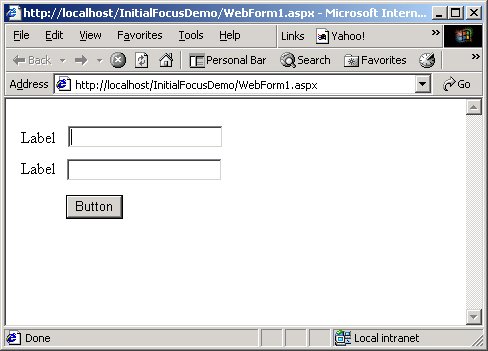
Textbox1 has the focus after the page is loaded.
WebForm1.aspx
<!DOCTYPE HTML PUBLIC "-//W3C//DTD HTML 4.0 Transitional//EN" >
<HTML>
<HEAD>
<metacontent="Microsoft Visual Studio 7.0"name="GENERATOR">
<metacontent="C#"name="CODE_LANGUAGE">
<metacontent="JavaScript (ECMAScript)"name="vs_defaultClientScript">
<metacontent="http://schemas.microsoft.com/intellisense/ie5"name="vs_targetSchema">
</HEAD>
<body>
<formid="Form1"method="post"runat="server">
<table>
<tr>
<td>
<asp:labelid="Label1"runat="server">Label</asp:label>
</td>
<td>
<asp:textboxid="TextBox1"runat="server"></asp:textbox>
</td>
</tr>
<tr>
<td>
<asp:labelid="Label2"runat="server">Label</asp:label>
</td>
<td>
<asp:textboxid="TextBox2"runat="server"></asp:textbox>
</td>
</tr>
<tr>
<td>
</td>
<td>
<asp:Button id="Button1"runat="server" Text="Button"></asp:Button>
</td>
</tr>
</table>
</form>
</body>
</HTML>
WebForm1.aspx.cs
using System.Collections;
using System.ComponentModel;
using System.Data;
using System.Drawing;
using System.Web;
using System.Web.SessionState;
using System.Web.UI;
using System.Web.UI.WebControls;
using System.Web.UI.HtmlControls;
namespace InitialFocusDemo
{
/// <summary>
/// Summary description for WebForm1.
/// </summary>
public class WebForm1: System.Web.UI.Page
{
protected System.Web.UI.WebControls.Label Label1;
protected System.Web.UI.WebControls.Label Label2;
protected System.Web.UI.WebControls.TextBox TextBox1;
protected System.Web.UI.WebControls.Button Button1;
protected System.Web.UI.WebControls.TextBox TextBox2;
public WebForm1()
{
Page.Init +=new System.EventHandler(Page_Init);
}
privatevoid Page_Load(objectsender, System.EventArgs e)
{
// Set the InitialFocus on TextBox1
ReflectionIT.Web.PageUtil.SetInitialFocus(TextBox1);
}
privatevoid Page_Init(objectsender, EventArgs e)
{
//
// CODEGEN: This call is required by the ASP.NET Web Form Designer.
//
InitializeComponent();
}
#region Web Form Designer generated code
/// <summary>
/// Required method for Designer support - do not modify
/// the contents of this method with the code editor.
/// </summary>
privatevoid InitializeComponent()
{
this.Load +=new System.EventHandler(this.Page_Load);
}
#endregion
}
}
Thanks to:
- Philip Quirke who reported a bug in an earlier version. I used the controls 'UniqueID' property instead of 'ClientID' in the SetInitialFocus() method.
- S Patil who reported that it didn't work with Netscape 4.7x browser. I have therfore changed the JavaScript.
- Scott Dinwiddie who reported the SmartNavigation problem.
- Waylon Campbell who reported the RadioButtonList problem.
Any suggestions and feedback for improving this article is most welcome. Send your suggestions and feedback to Fons.Sonnemans@reflectionit.nl
DownloadAll postings/content on this blog are provided "AS IS" with no warranties, and confer no rights. All entries in this blog are my opinion and don't necessarily reflect the opinion of my employer or sponsors. The content on this site is licensed under a Creative Commons Attribution By license.


Blog comments
0 responses