You should write your code in a consistent style. This is easier said then done. The SortCode macro helps you with this by sorting your C# code.
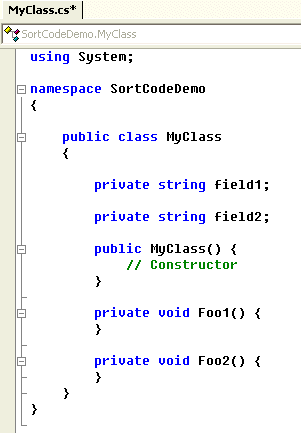
The SortCode macro sorts all members of a type (class or struct) on alphabetical order grouped by their type.
The default order of the types is:
- Events
- Fields
- Enums
- Constructor
- Destructor
- Properties and Functions
- Properties and Functions of implemented interfaces
This order can easily be changed by modifying the private class MemberComparer. This class implements the IComparer interface.
Usage
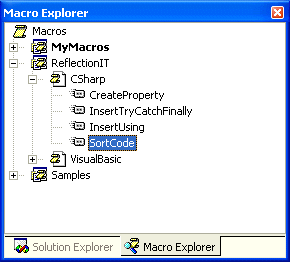
Unzip the Zipfile and open the 'ReflectionIT.vsmacros' file. The ReflectionIT macro project will be loaded into the Macro Explorer.
Open a C# sourcefile in the VS.NET editor.
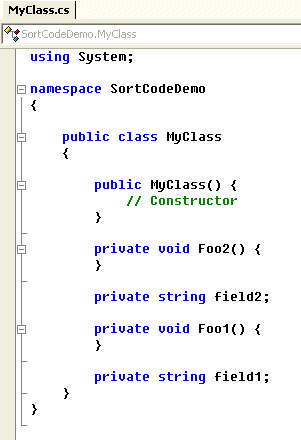
Run the SortCode macro from the CSharp module using the Macro Explorer. You will see that your code is sorted.
Warning
Only use the SortCode macro on projects which compile. It uses the Automation and Extensibility Reference (EnvDTE) of Visual Studio.NET. The EnvDTE can only work with CodeElements which are declared correctly.
You can Undo the SortCode macro using the 'Undo' menu option.
Other Macros
The ReflectionIT macro project also contains some other useful macros, for C# and VB.NET. I can imagine that more people have developed useful macros. Please mail them to me so I can extend my macro project.
Conclusion
The SortCode macro can help you organize your code. It demonstrates the power of Visual Studio.NET and the .NET Framework.
Any suggestions and feedback for improving this article is most welcome. Send your suggestions and feedback to Fons.Sonnemans@reflectionit.nl
DownloadAll postings/content on this blog are provided "AS IS" with no warranties, and confer no rights. All entries in this blog are my opinion and don't necessarily reflect the opinion of my employer or sponsors. The content on this site is licensed under a Creative Commons Attribution By license.


Blog comments
0 responses