Introduction
In Windows XP all wizard dialogs have a nice looking header. This WizardHeader control can be used to add these headers to your wizard forms.
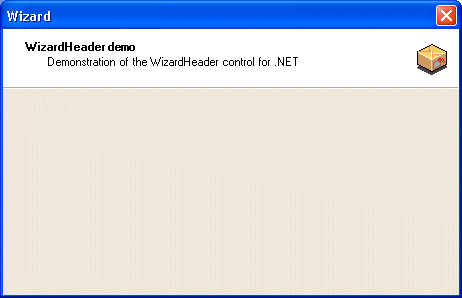
Usage
The following steps explain how you can use the WizardHeader control in your WinForm projects.
Step1 - Download the Zip file and extract it.
Download Wizard.zip and extract it to you local harddrive. This version was compiled using the final version of Microsoft .NET Framework SDK. The C# source of the WizardHeader control is included.
Step2 - Design the Form
Create a Windows Application project.
Step3 - Add the WizardHeader control to the Toolbox
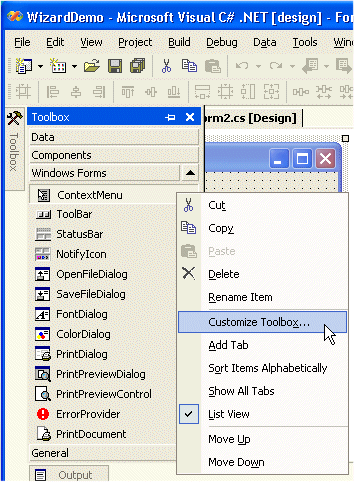
Right-click the Toolbox and select 'Customize Toolbox...'Select the '.NET Framework Components' Tab and click the 'Browse' button.
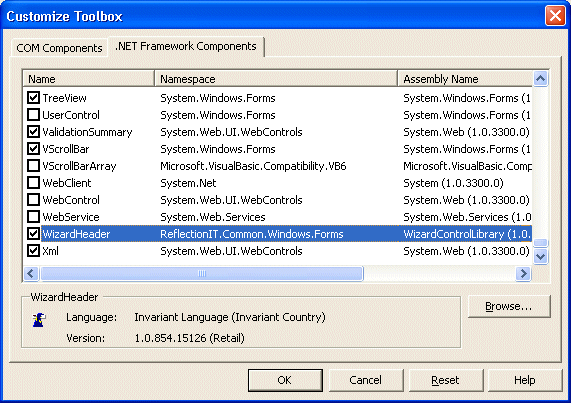
Open the 'WizardControlLibary.dll' in the Wizard\WizardControlLibrary\Bin\Release folder. The 'WizardHeader' control is checked and will be visible in the Toolbox. Click OK.
Step4 - Add a WizardHeader to the form and set its properties
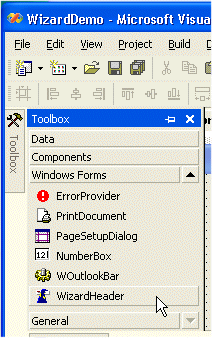
Set the properties:
- Text
- Description
- Image
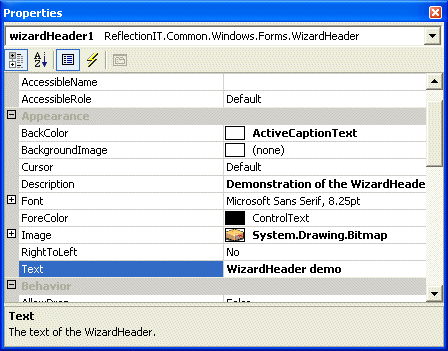
Step5 - Run the application
Conclusion
The WizardHeader control is an small control. Use it in your wizard forms or study it to learn more about creating .NET controls.
Any suggestions and feedback for improving this article is most welcome. Send your suggestions and feedback to Fons.Sonnemans@reflectionit.nl
DownloadAll postings/content on this blog are provided "AS IS" with no warranties, and confer no rights. All entries in this blog are my opinion and don't necessarily reflect the opinion of my employer or sponsors. The content on this site is licensed under a Creative Commons Attribution By license.


Blog comments
0 responses