Visual Basic 6.0 has an InputBox() function, Visual Basic.NET has one but in C# you don't. You can solve this easily by adding a reference to 'Microsoft.VisualBasic.dll' and use the static method Microsoft.VisualBasic.Interaction.InputBox().
The VB implementation has some shortcomings which I solved in my improved InputBox class. You never know whether the user entered a empty text or clicked the Cancel button. It is also impossible to have validation on the text.
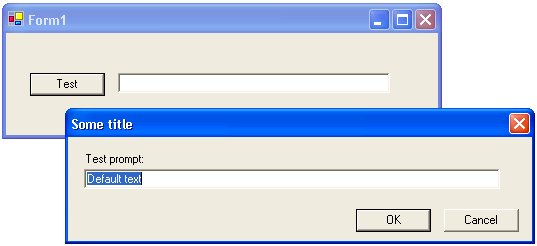
Example: InputBox
InputBox class
The InputBox class is a public class with a private constructor. You use it by calling the static Show method. This method instantiates a new instance of the class, sets it's properties and returns the result. The result is not a string but a InputBoxResult object. This object has two properties: OK and Text. OK is a boolean indicating that the user clicked the OK button and not the Cancel button. The Text contains the string the user entered.
InputBoxValidatingHandler validator,intxpos,intypos){
using (InputBox form=new InputBox()) {
form.labelPrompt.Text =prompt;
form.Text = title;
form.textBoxText.Text =defaultResponse;
if(xpos >=0 &&ypos >=0){
form.StartPosition = FormStartPosition.Manual;
form.Left = xpos;
form.Top = ypos;
}
form.Validator = validator;
DialogResult result=form.ShowDialog();
InputBoxResult retval=new InputBoxResult();
if(result == DialogResult.OK){
retval.Text = form.textBoxText.Text;
retval.OK = true;
}
returnretval;
}
}
publicstatic InputBoxResult Show(string prompt,stringtitle, stringdefaultText,
InputBoxValidatingHandler validator){
return Show(prompt, title,defaultText,validator,-1,-1);
}
Usage
You activate the InputBox by calling the static Show() method. It has 4 required and 2 optional arguments (using overloading).
InputBoxResult result= InputBox.Show("Test prompt:","Some title","Default text", null);
if(result.OK){
textBox1.Text = result.Text;
}
}
Validation
You can add validation logic using the validator argument. The validator is a InputBoxValidatingHandler delegate which you can use to validate the Text. The following sample checks whether the Text is not empty. If so it sets Cancel to true and the Message to 'Required'.
InputBoxResult result= InputBox.Show("Test prompt:","Some title","Default text",
new InputBoxValidatingHandler(inputBox_Validating));
if(result.OK){
textBox1.Text = result.Text;
}
}
privatevoid inputBox_Validating(objectsender, InputBoxValidatingArgs e){
if(e.Text.Trim().Length ==0){
e.Cancel =true;
e.Message ="Required";
}
}
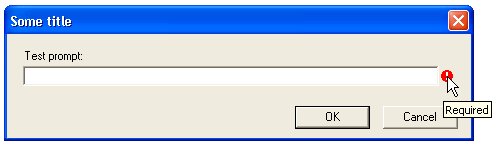
Example: Required text
Conclusion
The ImputBox class is just a simple class which you can use in your Windows Forms application to prompt for a text. It can also be used from Visual Basic.NET when you compile it in a Library and reference this Library from you VB project.
Any suggestions and feedback for improving this article is most welcome. Send your suggestions and feedback to Fons.Sonnemans@reflectionit.nl
DownloadAll postings/content on this blog are provided "AS IS" with no warranties, and confer no rights. All entries in this blog are my opinion and don't necessarily reflect the opinion of my employer or sponsors. The content on this site is licensed under a Creative Commons Attribution By license.


Blog comments
VictorVE
05-Aug-2013 9:36PeggyH.
25-Jul-2020 5:47