I have always wondered how hard it would be to write a game in C#. I picked Minesweeper for my first try. Made an OO design and then went programming.
See the result in the downloadable zip file. The whole program is less then 400 lines of code!
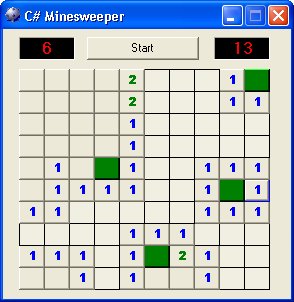
Screenshot
I have reduced the complexity a bit by eliminating the flag-icon and all menu options.
Design
The application is build using 3 objects: a Form, a Game which holds an array of Square objects.
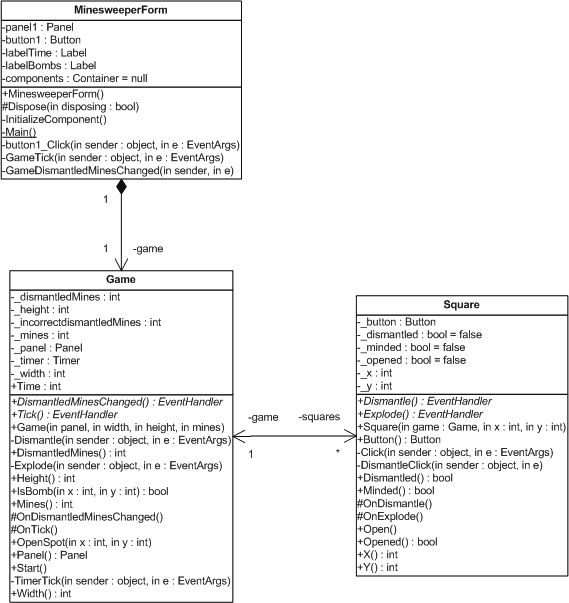
UML Class Diagram (Visio)
MinewsweeperForm class
This class creates a Game object when the Start button is clicked. It also updates the Timer and Mines display. It contains a Panel control in which the Game object generates the Squares.
Game class
This class contains a multidimensional array of Square objects which is initialized in the constructor. The mines are randomly placed in the squares. It has a Timer which is used to calculate the elapsed gametime. The events DismantledMinesChanged and Tick are used to notify the MinesweeperForm that is has to update the GUI.
Square class
This class contains a normal WinForm Button object which Click and MouseDown events are captured. These events trigger the real game logic. The number of surrounding mines is calculated (cascading). Mines are dismantled (marked) or explode which is reported to the Game object using events.
Conclusion
Writing the Minesweeper game was a lot of fun. It demonstrates how object orientation really makes it easy. Examine it by stepping trough the code using the VS.NET debugger. I hope you enjoyed this article and sample.
Any suggestions and feedback for improving this article is most welcome. Send your suggestions and feedback to Fons.Sonnemans@reflectionit.nl
DownloadAll postings/content on this blog are provided "AS IS" with no warranties, and confer no rights. All entries in this blog are my opinion and don't necessarily reflect the opinion of my employer or sponsors. The content on this site is licensed under a Creative Commons Attribution By license.


Blog comments
Carsen
13-May-2014 6:57hasan
20-May-2014 12:04hasan
20-May-2014 12:05ashok
20-Dec-2014 11:23gowthami
23-Dec-2014 6:22Gay
05-Oct-2020 2:18