During development, you can use the output methods of the Debug class to display messages in the Output window of the Visual Studio 2005 integrated development environment (IDE). For example:
Trace.WriteLine("Hello World!")
Debug.WriteLine("Hello World!")
Trace.WriteLine("Hello World!");
Debug.WriteLine("Hello World!");
Each of these examples will display "Hello World!" in the Output window when the application is run in the debugger.
The .NET TraceListners monitor trace and debug output. You use TraceListners to redirect this output to a specific medium. There are 3 TraceListners available: DefaultTraceListener, EventLogTraceListener and TextWriterTraceListener.
The NotificationFormTraceListener is a special TraceListner which allows you to monitor the output in a special TraceForm which can be activated using a Notification icon.
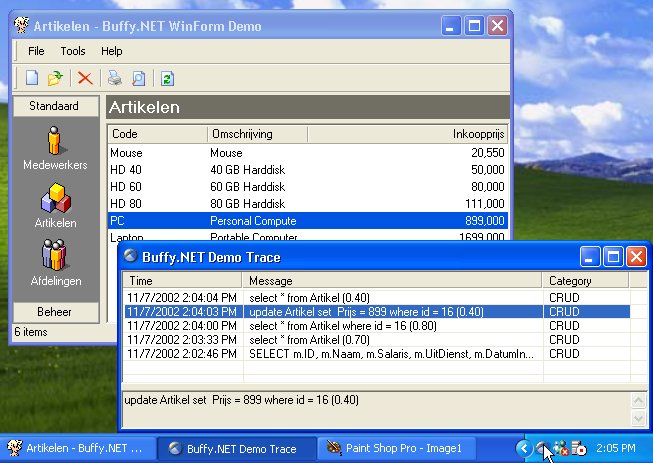
Sample: TraceForm used to monitor SQL statements
Usage
The NotificationFormTraceListener can be used in a Windows application. You have to create one and add it to the (static) Listeners collection of the System.Diagnostics.Trace class.
Don't forget to Dispose the listener when you exit the application. This is necessary because an extra Thread is used for the NotificationFormTraceListener. This Thread doesn't stop automatically.
/// The main entry point for the application.
/// </summary>
[STAThread]
staticvoid Main()
{
// Initialize the TraceListener
ReflectionIT.Diagnostics.NotificationFormTraceListener
m_listner=new ReflectionIT.Diagnostics.NotificationFormTraceListener();
// Add it to the Listeners collection
System.Diagnostics.Trace.Listeners.Add(m_listner);
// Run the MainForm
Application.Run(new TraceFormTest());
// Dispose all TraceListeners
foreach (TraceListener l in Trace.Listeners){
l.Dispose();
}
}
Sample: static Main
ContextMenu
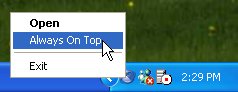
The ContextMenu of the NotificationIcon makes it possible to Open the TraceForm, set the 'Always on Top' option and Exit.
Add Tracing using the Configuration file
You can add TraceListeners from your code but you can also add them by editing the configuration file that corresponds to the name of your application. Within this file, you can add a listener, set its type and set its parameter, remove a listener, or clear all the listeners previously set by the application.
<system.diagnostics>
<traceautoflush="true"indentsize="4">
<listeners>
<addname="myListener"
type="ReflectionIT.Diagnostics.NotificationFormTraceListener, ReflectionIT.Diagnostics"
initializeData="Buffy.NET Demo Trace"/>
</listeners>
</trace>
</system.diagnostics>
</configuration>
Sample: BuffyDemo.exe.config
Conclusion
TraceListers can help you to debug your code. The NotificationFormTraceListener helps you to monitor the Trace and Debug output in more convenient way.
Any suggestions and feedback for improving this article is most welcome. Send your suggestions and feedback to Fons.Sonnemans@reflectionit.nl
Thanks to:
- Damien Pitman who reported and solved a threading problem (bug).
Tags
CSharpAll postings/content on this blog are provided "AS IS" with no warranties, and confer no rights. All entries in this blog are my opinion and don't necessarily reflect the opinion of my employer or sponsors. The content on this site is licensed under a Creative Commons Attribution By license.


Blog comments
0 responses