Benieuwd naar de laatste ontwikkelingen rondom software ontwikkeling en Reflection IT? Onze slimme koppen delen regelmatig hun kennis en ervaring. Zo weet jij wat er speelt!
The PageUtil class has a static method SetInitialFocus(control) which can be used to generate a JavaScript for an ASP.NET page (WebForm), which sets the focus on a (given) control.
private voidPage_Load(objectsender, System.EventArgs e) { // Set the InitialFocus on TextBox1 ReflectionIT.Web.PageUtil.SetInitialFocus(TextBox1); }
It took me today some time to figure out how to sort an array of strings case-sensitively. The default behavior of the Array.Sort() uses an default Comparer object which should be case-sensitive. When I tested this I found out that I had misinterpreted the definition of 'case-sensitive'. What I wanted was 'Oridinal' sorting. So I created an OrdinalStringComparer class which implements IComparer and I got what I wanted.
SharePoint is a great product. In this article I will demonstrate this by creating a Web Part which acts like a container for normal ASP.NET User Controls (.ascx files). This makes it very easy to customize a portal page by adding normal ASP.NET User Controls to it.
I have used the EventsHelper class to fire events asynchronical. I came across this class in the TechEd 2003 presentation C# Best Practices from Eric Gunnerson and Juval Löwy. Today I noticed a bug. The FireAsync() method uses the 'Fire and Forget' pattern incorrectly.
The 'Fire and Forget' pattern is used when the return value and returned parameters of the call are not required, and when there is no need to synchronize with the asynchronously executing method. In this case, the caller simply needs to call BeginInvoke, passing any normal and ref parameters, and null for the callback and asyncState.
This has been a commonly used pattern. However, there has been a documentation change in version 1.1 of the .NET Framework that has big ramifications for this technique of making async calls. The documentation now states that EndInvoke must be called for a corresponding BeginInvoke--otherwise Microsoft say they may now, or in the future, leak resources. It appears that no resources are leaked under version 1.0 of the framework; however, with this type of warning in place, it is recommended that a call to EndInvoke be made even if the return values of an async call are not required.
It is relatively straightforward to create a helper class that handles this for you--one example I found here.
I have written the following DateDiff() function in C#. VB.NET users already had it using the Micrsoft.VisualBasic.dll assembly. Now you can use it without referencing this 'ugly' extra assembly.
NDoc 1.2 generates class libraries documentation from .NET assemblies and the XML documentation files generated by the C# compiler. NDoc uses add-on documenters to generate documentation in several different formats, including the MSDN-style HTML Help format (.chm), the Visual Studio .NET Help format (HTML Help 2), and MSDN-online style web pages.
This article explains the four steps to take in order to integrate the HTML Help 2 file you generated into Visual Studio.NET.
I have created a small quick reference card for Microsoft .NET with some hard to remember details. My printer supports two pages per side and double sided printing. This makes it possible to print the 4 pages on a single sheet which makes it easier to use.
Contents:
C# String escape sequence
C# Numeric & Char Literals
String Formatting
Standard Numeric Format Strings
Custom Numeric Format Strings
Standard DateTime Format Strings
Custom DateTime Format Strings
Regular Expressions
I hope you will find it useful.
Any suggestions and feedback for improving this reference card is most welcome. Send your suggestions and feedback to Fons.Sonnemans@reflectionit.nl
I have read that the .NET framework has great features to localize your application. I had to use them recently to create an English, Dutch, French and German "version" of one of my applications. I found out they worked well but it was very time consuming to set all the text properties of all controls for each language. Even worse you have to translate common terms like: OK, Cancel, New, Open, Close, etc. on every form if you want to use the designer. You can, of course, write code to fetch them all from one resource file. But I don't like to write code, especially if you don't have to.
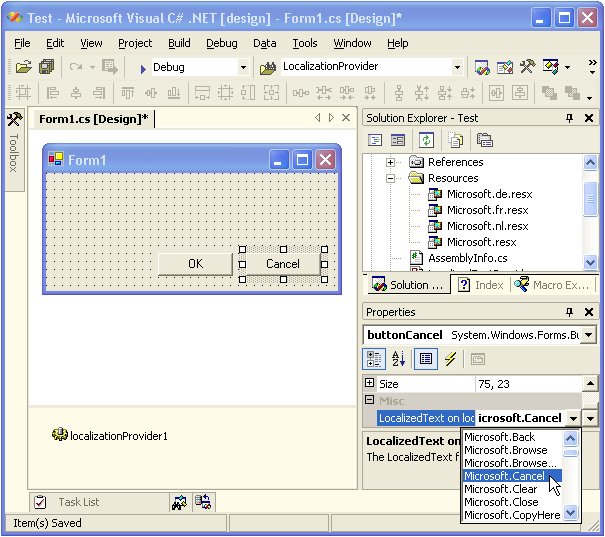
I came up with a solution for this problem, called the LocalizedTextProvider component. This component is actually an extender which, adds a LocalizedText property to a Control or MenuItem. When you add this component to a WinForm it will allow you to set the LocalizedText property ('Misc' category) of all controls on your form. You can select a Key from a predefined list. This list contains all keys from the string resources in the component. I have filled the list using the International Word List from the 'Microsoft Official Guidelines for User Interface Developers and Designers' website.
Example: the LocalizedText property for the Cancel button is set to Microsoft.Cancel
The Text for the Cancel button will automatically be translated to 'Annuleren' for Dutch users, 'Abbrechen' for German users and 'Annuler' for French users. You can test this by setting the CurrentUICulture property of the CurrentThread to a Dutch, German or French CultureInfo.
I have found a great tool on the GotDotNet user samples website
WinChurn allows you to compare two versions of the same managed assembly. This is extremely helpful when tracking changes in your assembly. The tool comes with a help system, as well as some examples to get you started. Optionally, the tool allows you to generate a policy file, however caution is urged when using this feature. While the tool is extremely robust and accurate at detecting public API changes, it cannot detect internal changes. The tool uses Reflection to generate the results.
Met dit formulier kunt u informatie over een In-Company of Small-Group training aanvragen. U kunt in het bericht aangeven welke training u wilt, voor hoeveel personen, wanneer deze verzorgd moet worden en op welke locatie. Wij nemen vervolgens contact met u op.